LyricWiki stores all the artist and song information using the plain English alphabet it seems. So when I have the proper tag: Željko Joksimović as the artist in my songs, I have no luck: http://lyricwiki.org/Zeljko_Joksimovic. Functionality should be added so that further entries to closest matches are possible using a text file, similar to the current replace-words.txt etc. I am thinking of the following format:
z,,,, ź,,,, ž,,,,ż
c,,,, ć
This means when there are no matches for a word with Ž then it will replace all instances of Ž with Z. The same would happen if the word had Ź. The replace should happen for both cases: simple and capital. User can just input one entry.
So when iTSfv comes across Željko Joksimović – Lane Moje song:
- It looks up Željko Joksimović and Lane Moje.
- When there are no results, iTSfv loads the closest-matches.txt file
- The text file is split by line
- Each line is split by ,,,,
Each line is a ClosestMatch object, a structure or a class. For example, ClosestMatch.Letter is z. ClosestMatch.Aliases is a new list of strings: ź, ž, ż
For each closest match object, replace of letters would happen twice: for simple and capital.
Replacing simple letters:
- Replace ź with z
- Replace ž with z
- Replace ż with z
Replacing capital letters:
- Replace Ź with Z
- Replace Ž with Z
- Replace Ż with Z
Optimization is possible by checking if the letter ź exists first, before starting to replace.
Željko Joksimović is ultimately replaced by Zeljko Joksimovic and lyrics are found.
Edit 1:
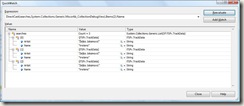
Following picture shows the possible matches determined by iTSfv for Zeljko Joksimovic.
Edit 2:
This does not quite work well for songs such as Ángel De La Muerte. In LyricWiki the song is as Ángel De La Muerte. Suppose I have the song as Angel De La Muerte. Then the above closest match method changes all the A letters to Á. The artist name changes from Avalanch to Ávalanch. Replacement could be done at character level but then it adds tremendous load on LyricWiki servers.
It is yet not clear what’s the best way to handle this issue.

